Bill Payment Reminder, Budgets
- 4.5
- Rating
- 1.00M
- Installs
- Free
- Price

 Analysis by App-foxy
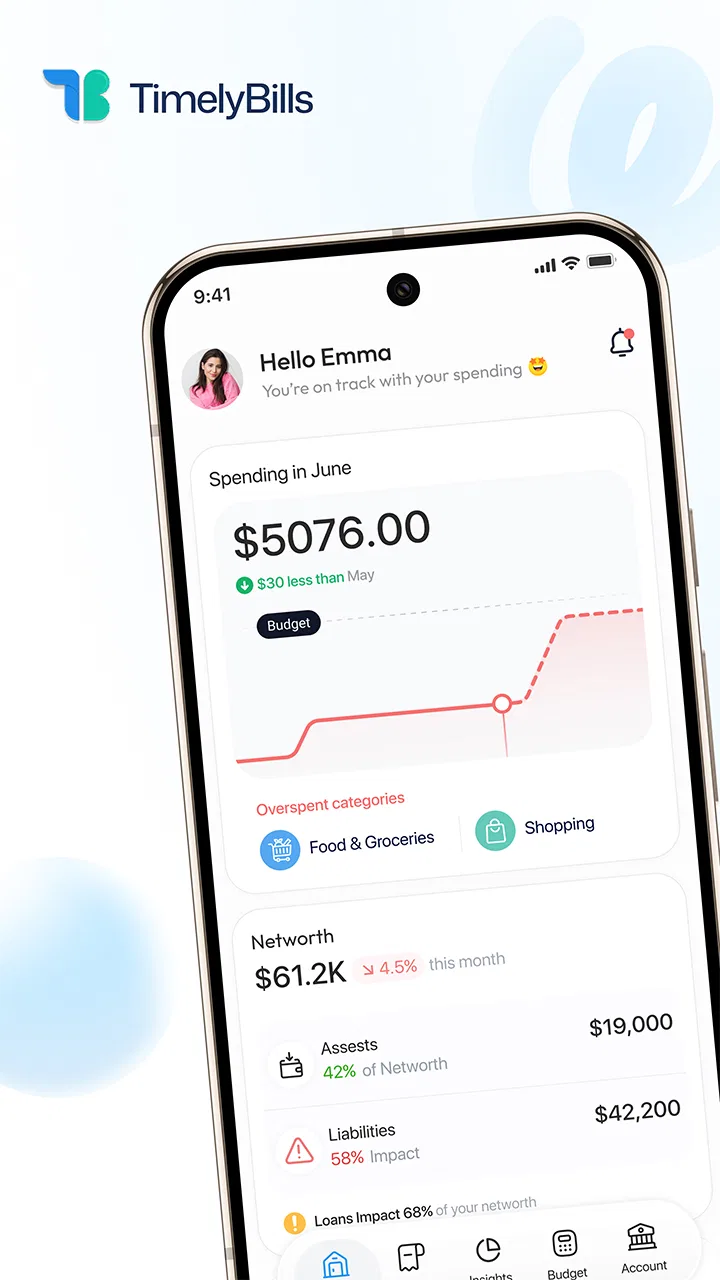
Managing bills is rarely difficult because of the payment itself. The real problem is remembering which payment is due, how much it will be, and whether it has already been handled. Bill Payment Reminder, Budgets approaches that problem as a finance app from TimelyBills, combining reminders, payment tracking, budgeting, and family money management in one place. I found its appeal less in flashy presentation and more in the way it can turn scattered monthly obligations into a routine you can actually follow.
I would describe it as a practical organizer rather than a complete replacement for a bank app. It does not need to be the place where every financial decision happens. Its useful role is sitting between your calendar, bank account, paper notes, and memory, giving recurring bills and household spending a clearer structure. That distinction matters: if you want investment analysis or advanced accounting, you may need something else. If you mainly want to stop overlooking subscriptions, utilities, rent, or shared household expenses, this app is much easier to understand.
How the app builds trust before you rely on it
Bill Payment Reminder, Budgets has been available since May 23, 2015, and its long presence is one reason I would be comfortable considering it for an everyday organizational task. It is free to install, rated for Everyone, and offers optional in-app purchases ranging from $0.99 to $64.99 per item. The free entry point makes it possible to explore the workflow before deciding whether extra paid functions fit your needs.
You May Also Like

 Blood Strike: 2.5 Anniversary
Blood Strike’s Loadouts Turn Every Drop Into a Tactical Gamble
A close look at Blood Strike’s custom loadouts: how fast access to signature weapons reshapes its battle royale rhythm, rewards preparation, and narrows the gap between fights.

 Pandora - Music & Podcasts
Pandora’s Music Is Easy to Start, but Harder to Recover
Pandora’s strength is its low-effort path from a seed to a station. Its weak spot is how much confidence it asks you to place in connection, setup, and quiet recovery.

 8 Ball Pool
 Is Built on Rivalries, Rematches, and Routine
A close look at the rivalries, rematches, shared routines, and unanswered safety questions that turn a quick pool match into a persistent mobile community.

 Samsung Music
’s Quiet Strength Is Playing What You Already Own
Its reach comes less from spectacle than from dependable access to a personal library. That simplicity is both the app’s strongest retention engine and its ceiling.

 AccuWeather: Weather Radar
AccuWeather Review: A Quick, Clear Forecast for Everyday Decisions
For everyday plans, the best forecast is the one you can understand quickly. AccuWeather makes rain timing, radar, and local conditions easy to act on, with a few trade-offs.

 Hill Climb Racing
Why Hill Climb Racing Still Turns Crashes Into One More Run
A tiny car, a bumpy hill and one more upgrade: Hill Climb Racing keeps resurfacing because its simple chaos makes every near-miss feel personal.
More From Our News Desk



Its public reception is also encouraging without being a reason to switch off your judgment. The app has an average rating of 4.5 from around 36 thousand ratings, with roughly 7.7 thousand written reviews, and it has passed one million installs. Those figures suggest that many people have found the basic idea useful, but they do not tell me whether the app suits a particular household. A reminder system is personal: someone with three monthly bills needs a lighter setup than a family tracking several accounts and due dates.
The developer name, TimelyBills, is visible rather than hidden behind a vague publisher identity. That gives the product a clearer point of accountability, although I still recommend reading the app’s current permission prompts and privacy choices on your own device before entering sensitive financial information. A finance tool earns confidence through understandable choices, not simply through a high rating or a familiar-looking interface.
The current version is 1.26.003 and the minimum requirement is Android 5.0. That broad compatibility is useful if you keep an older phone, though compatibility alone should not decide whether you use it. I would first check how comfortably the app fits your preferred way of recording payments and whether its account controls match the level of access you are willing to grant.
What I would set up first
My first session would be deliberately small. I would add only the bills that cause the most stress, such as rent, electricity, internet, insurance, or a recurring subscription. Starting with every expense at once makes any budgeting app feel like paperwork. A short initial list lets you test whether the reminder timing, payment marking, and overview screens genuinely help before you invest more effort.
For each bill, I would use a name that makes sense at a glance rather than copying a formal statement title. “Home internet” is more useful in a busy list than an account reference. I would also enter the amount carefully and review the due date immediately. A reminder is only valuable when its underlying date is correct, and a small setup mistake can create either false urgency or a missed payment.
The best workflow is to treat the app as a confirmation log, not as proof that money has left your bank. When I mark a bill as paid, I would do so after checking the actual payment confirmation in my bank or payment service. That extra step prevents a common mistake: confusing an intention to pay with a completed transaction. The app can organize the process, but the financial institution remains the place where the transaction itself is verified.
Reminders are most useful when they support a routine
A reminder list becomes more powerful when I review it at a fixed time each week. For example, I might open the app on Friday evening, look at what is due next, and compare those amounts with the balance available for household expenses. This is more reliable than waiting for a notification to solve everything at the last minute.
One practical trick is to separate bills by the action they require. A fixed rent payment can be treated differently from a variable utility bill, and a subscription can be checked for continued usefulness before it renews. Even if the app presents them in a shared financial view, my own naming and review habits can preserve that distinction. This reduces the chance that a small recurring charge disappears among larger obligations.
Another useful habit is recording the payment date as soon as the transaction is confirmed, not at the end of the month. That keeps the history closer to reality and makes the app more useful when I am trying to remember whether a payment has already gone through. The trade-off is that the system depends on consistent manual attention. Anyone expecting automatic accuracy without regular checking may find this approach frustrating.
Budgeting beyond a simple bill list
The budgeting side gives the app a broader purpose. A bill reminder answers, “What must I pay?” A budget asks, “What can I safely spend after those obligations?” Keeping those questions together is helpful because a household can pay every bill on time and still lose control of discretionary spending.
I would begin with a modest number of categories instead of creating a detailed label for every purchase. Housing, utilities, transport, food, subscriptions, and flexible spending are usually enough to reveal the main pressure points. Too many categories create a maintenance burden, especially when several people contribute information. The goal is not to produce perfect accounting; it is to make the next decision clearer.
A particularly useful approach is to budget around the timing of bills rather than only their monthly totals. If several payments arrive during the same week, the household may feel short of money even when the overall monthly budget looks reasonable. By reviewing upcoming obligations alongside spending limits, I can identify those crowded periods early and avoid treating available account balance as completely free money.
There is also a subtle difference between planning and recording. A budget is a forward-looking promise, while a payment tracker is backward-looking evidence. I would use the budget to decide what should happen and the payment history to check what did happen. Mixing those roles can make a plan look healthier than reality, so I would review both rather than relying on a single total.
Family budgeting requires clear responsibility
The family money manager angle is appealing for households where one person usually remembers everything. A shared financial routine can reduce the burden on that person, but it only works if everyone agrees on what is being recorded and who is responsible for confirming payments. I would not assume that adding family members automatically creates accountability. The household still needs simple rules.
For example, one person could maintain recurring bills while another records variable household purchases. A short weekly review can then resolve anything unclear. This is more practical than asking everyone to enter every small expense, which often leads to incomplete records. The app is most helpful when the process is light enough that people continue using it.
I would also avoid putting unnecessary personal detail into shared notes. A bill name and amount may be enough for coordination. Sensitive account references, login information, or private financial explanations should not be used as casual reminders. This is a general safety habit, but it matters more when an app becomes part of a family’s shared routine.
Where data sensitivity matters most
Finance apps deserve a slower setup than a shopping list or a game because the information entered can reveal household habits. Before I add anything, I would inspect the permission requests shown by my device and consider whether each one is necessary for the way I plan to use the app. I would not grant access automatically just because a permission prompt appears during onboarding.
I would also look for visible account controls, sign-out options, and ways to manage or remove information inside the app. These controls matter more to me than decorative features. If I stop using a bill tracker, I want a clear path to stop the account from remaining part of my routine. I would review the privacy policy and in-app settings directly, because data practices and available controls can change with updates.
The most sensitive moment is not necessarily entering a bill name. It is deciding whether to connect financial accounts, share access with another person, or store details that could identify an account. My cautious approach would be to begin with manual entries and no unnecessary credentials. That lets me evaluate the reminder and budgeting workflow while limiting the amount of information held in the app.
I would never use a bill reminder as a place to store passwords, full card numbers, security answers, or one-time verification codes. A useful organizer does not need to become a private vault for unrelated secrets. Keeping those details out of the notes also makes the household record easier to share safely.
Controls that keep the user in charge
The strongest reason to use this app is that it supports deliberate decisions instead of pretending to make them for me. I choose what to record, when to review it, and when a payment is genuinely complete. That user agency is valuable because financial automation can be convenient but also easy to misunderstand.
I would pay attention to the difference between a reminder and an automatic payment. A notification can tell me to act, but it does not necessarily transfer money. That distinction should be explained clearly within my own household, especially if more than one person assumes someone else has handled a bill. A shared list without a clear confirmation habit can create false confidence.
The free installation is a sensible way to test this balance. I would use the core workflow first, then decide whether a paid item solves a problem I actually have. Optional purchases between $0.99 and $64.99 per item cover a wide range, so I would inspect each purchase screen carefully and avoid paying simply to unlock features I may not use. A budgeting app should reduce financial friction, not encourage an impulsive expense.
Because the app is aimed at Everyone, it may feel approachable for a broad household audience. That does not mean every financial situation is equally suitable. A person managing a small business, multiple currencies, investments, taxes, or detailed debt repayment may need specialized software. I would choose this app for household organization, not for formal financial reporting.
Everyday scenario: preparing for a crowded payday week
Imagine that my rent, phone service, electricity estimate, and two subscriptions all fall close together. I could keep those dates in a calendar, but a calendar does not naturally show the relationship between the obligations and my spending plan. In this app, I would place the bills in one review routine, check the expected amounts, and mark each payment only after confirming it through the relevant payment service.
That process gives me three useful checkpoints. First, I can see the upcoming commitments before spending freely. Second, I can compare fixed obligations with the budget for food, travel, and other flexible costs. Third, after payment, I can maintain a simple record so the same bill does not receive a second unnecessary payment. The benefit is not automation; it is reducing the number of separate places where I must remember the same information.
If the electricity amount changes, I would update the entry rather than blindly trusting an old figure. If a subscription is no longer wanted, I would cancel it through the provider and then remove or revise its reminder. This is an important limitation and strength at the same time: the app can help me notice a recurring charge, but I still have to make the provider-side decision.
How it compares with familiar alternatives
A phone calendar is better when I only need occasional date alerts and do not want a dedicated finance workspace. It is quick, familiar, and unlikely to require a new routine. However, it usually leaves budgeting and payment history in separate places. Bill Payment Reminder, Budgets makes more sense when the dates need to be considered alongside household money.
A spreadsheet offers more flexibility. I can design columns for due dates, categories, payment status, and notes, then create formulas that match my exact system. The downside is maintenance. A spreadsheet can become difficult to use on a phone, and a family member may not know which cells to edit. This app is the better choice when I value a ready-made bill and budget workflow over complete customization.
A bank app is the strongest option for checking real balances and confirmed transactions. It may also provide its own alerts. But bank tools are often centered on one institution, while household obligations can come from many providers. I see this app as a planning layer across those obligations, not as a substitute for checking the bank’s transaction record.
Specialized budgeting software may be better for people who want detailed reports, extensive account synchronization, investment tracking, or advanced categorization. The trade-off is usually greater setup and a steeper learning curve. This app is more attractive when the main goal is dependable household awareness rather than a complete financial dashboard.
Who should use it, and who should skip it
I would recommend it to someone who misses due dates, manages recurring household payments, or wants a shared view of bills and spending without building a system from scratch. It is also a reasonable starting point for someone who wants to develop a weekly money review habit. The combination of reminders, payment tracking, and budgeting addresses the common gap between knowing what is due and knowing what remains safe to spend.
I would be more cautious about recommending it to someone who refuses manual entry or expects every financial event to update itself. The value depends on accurate setup and regular confirmation. If you will ignore reminders, never update changing amounts, or assume a marked payment is automatically processed, no bill tracker will protect you from mistakes.
I would also look elsewhere if privacy expectations require keeping all financial planning entirely offline, or if the app’s current permission and account choices do not feel comfortable after inspection. Trust should be personal and informed. A useful feature is not worth granting access that exceeds what I am willing to share.
Finally, people with complex financial needs should treat this as a household organizer, not a professional accounting system. It can help make obligations visible, but it is not the right tool for every form of financial analysis. Choosing a narrower app for a narrower job is often safer than forcing one organizer to cover everything.
My cautious verdict
Bill Payment Reminder, Budgets succeeds when I use it as a disciplined checkpoint between upcoming obligations and real payment confirmations. Its strongest qualities are practical: it brings bills, budgets, and family coordination into one focused routine, while remaining accessible as a free app for Android users on older supported systems. The long availability, TimelyBills developer identity, and broad user adoption add useful context, but I would still judge it by the controls and choices visible on my own device.
The main weakness is the responsibility it leaves with me. I must enter accurate information, review changing amounts, distinguish reminders from completed payments, and decide how much sensitive detail belongs in the app. That is not a flaw unique to this product, but it is important enough to shape my recommendation. The app can organize my attention; it cannot replace careful financial verification.
My advice is to start with a few important bills, use conservative personal information, inspect permissions and account settings, and test the weekly review habit before considering an in-app purchase. If that routine makes upcoming payments easier to understand, the app is doing its job. For me, its real value is giving the user a clearer financial checklist without taking control away from the user.
FAQs for Bill Payment Reminder, Budgets
01What platforms is the Bill Payment Reminder, Budgets app available on?
The Bill Payment Reminder, Budgets app is available on both Android and iOS platforms, making it accessible to a wide range of users. You can download it from the Google Play Store for Android devices or the Apple App Store for iOS devices, ensuring compatibility with most modern smartphones and tablets.
02How does the Bill Payment Reminder feature work?
The Bill Payment Reminder feature allows users to set up notifications for upcoming bill payments. You can customize reminders based on your preferences, such as receiving alerts a few days in advance. This feature helps prevent late payments by keeping you informed about due dates through push notifications or emails.
03Is my financial data secure with this app?
Yes, the app prioritizes user security by implementing robust encryption methods to protect your financial data. All sensitive information is stored securely, and the app follows industry-standard security protocols. Additionally, user data is not shared with third parties without consent, ensuring privacy and security.
04Can I track multiple budgets simultaneously?
Absolutely. The app allows you to create and manage multiple budgets at once. Whether you're tracking personal expenses, family budgets, or business finances, you can easily switch between different budget categories. This feature helps you maintain a comprehensive view of your financial health across various domains.
05Does the app offer any integration with other financial tools?
Yes, the app supports integration with various financial tools and services. This includes linking with bank accounts for automatic transaction updates, as well as compatibility with popular apps like Google Sheets for detailed analysis. Integration enhances the app’s functionality by providing a unified financial management experience.
Pros
- User-friendly interface for easy navigation.
- Customizable alerts for due dates.
- Supports multiple currencies.
- Integration with calendar apps.
- Secure data encryption.
Cons
- Limited free version features.
- Ads in free version can be intrusive.
- No offline access option.
- Requires account creation to use.
- Occasional sync issues with bank data.

Bill Payment Reminder, Budgets
Gallery